Showing posts with label AX2009. Show all posts

Wednesday, January 9, 2019

How to Import code XPO to D365 Finance & Operations

The following is a process to use the LCS Code Upgrade tool to import code from AX 4.0 or AX 2009 to D365.

Before you read any further, the key thing here is that you need access to an AX 2012 environment.  You need to use the 2012 environment as a midpoint in the process because only 2012 a) is supported by LCS Code Upgrade tool and b) can import xpo code.  If you don't have access to a 2012 environment, then the following probably won't be helpful to you.

So here's the process:
Prepare the AX 2012 environment
When you use the LCS Code Upgrade tool, you import zip file containing a modelstore.  (not a model!).  If you're like me, you're really only looking to move a subset of customizations...not every last object in your old AX.  The solution here is to use a 'vanilla' 2012 instance.  

There are multiple ways to do this, but I did it by Uninstalling all models except the core sys/syp layer stuff.  LCS Code upgrade will see all the core AX code in your model store, but just ignore it because it's all standard.  

WARNING: Before you uninstall models, make sure you a) have a way to get this code back, b) realize that any data tables defined by uninstalled models (or fields) will be lost.  In my case, I'm using a development environment with no valuable data.  I exported the model store (see procedure below) BEFORE uninstalling any models...and later I'll re-import that model store so I retain all my code.

In 2012 you can see the installed models in Tools, Model management, Installed models

Back up your 2012 code
If you're going to uninstall models from the 2012 environment, you probably want some way to get them all back later.  To 

Uninstall unwanted models
I uninstalled VAR/CUS/USR layer models and all 3rd party (ISV) code.
To uninstall use Windows Powershell (run as Administrator) or AXUtil.  (https://technet.microsoft.com/en-us/hh433514(v=ax.50))
For example:

Now your Installed models should look something like this:

Create a new model in 2012
Create a model with the same name as the model that you intend to use in D365
To do this, in AX 2012: Tools, Modules, Create new model.


Export your code from 4.0 or 2009 in an xpo.

Import your XPO code into 2012
Making sure that you're working in your new model (see lower right of AX screen), import your xpo code from your original environment like you normally would.  The infolog that you get here can be helpful in making sure that you got all the objects that are referenced in the code.  If you missed something, just import it into 2012 - no big deal.

Export the model store
Back in Powershell or AXUtil, export your model store which will contain the sys/syp core code and whatever you imported from your xpo.
For example

The file that is created will be big - maybe 5GB - so make sure you have room on your drive.  But it zips down quite a bit smaller - under 1GB.  The zipped file is what you upload to LCS.

LCS Code Upgrade process
From this point on you'll be following the standard AX2012 -> D365 Code Upgrade process.  Here's a good video overview: https://www.youtube.com/watch?v=M-AtR6ocYM8

One note on what the video covers: Each time you do the Code Upgrade process, you'll see a new folder created under Releases in Azure Dev Ops (or VS Team Explorer, Source Control explorer).  See the 8.1.136.24_U1...folders below.  It was interesting that, while a new 8.1.136.24_U1...folder was created for each Code Upgrade, only a single AX2012 folder was created and it was just updated each time the Cost Upgrade was done.
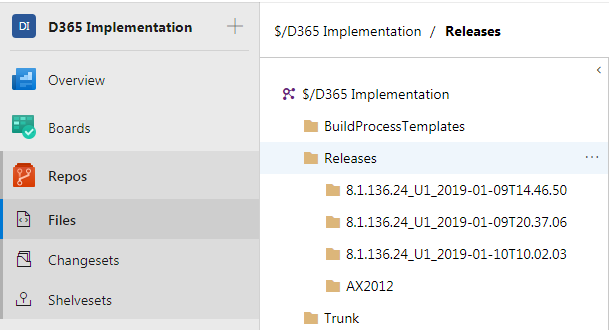
At first I thought we'd want to use the 8.1.136.24_U1...folder (I'd seen that in doc/videos online), but there were a few issues with that.  In my case the model was prepended by "ApplicationSuite."  Also the 8.1.136.24_U1...folder was missing the XppMetadata folder.  The AX2012 folder, however, had the correct model and included the XppMetadata folder. (Note that the AX2012 folder seems to be overwritten with each run of Code upgrade...so keep that in mind as you decide when to do your merging as discussed below)

So, rather than mapping my VS workspace to one of the 8.1.136.24_U1...folders, I did two merges from the model (ie CompanyNameExtensions) and XppMetadata folders to the corresponding DEV branch locations.   (Notes: In my case the descriptor file that I already had in my dev branch was more accurate, so I didn't merge that.  Also, the Foundation and Update for Foundation folders in my image below can be ignored - they shouldn't be there.  Also, you'll notice that I didn't do anything with the Projects folder because in my case the canned projects that are created by LCS Code upgrade were not helpful.  But you could merge those from the 8.1.136.24_U1...folder to your DEV branch projects folder)


The merges create source-controlled, but not-checked-in objects in the DEV branch and from there you can use VS to build your model and resolve your errors.

Hope that helps!  Have fun!

Friday, June 27, 2014

AX 2009 Open Transaction Editing Mark All

A while back I posted some "Mark All" code for AX 4.0 here: http://natepaine.blogspot.com/2010/10/mark-all-for-open-cust-trans-and-open.html

Today I had a need to write the same code in AX 2009.  It's much simpler in 2009.  Just create a form method "customMarkAll" and call it from a button on the custOpenTrans form.

void customMarkAll()
{
    CustTransOpen   custTransOpenBuffer;
    int             linesProcessed;
    ;

    for (custTransOpenBuffer = custTransOpen_ds.getFirst(false) ? custTransOpen_ds.getFirst(false) : custTransOpen_ds.cursor();
        custTransOpenBuffer; custTransOpenBuffer = custTransOpen_ds.getnext())
    {
        if (manager.getTransMarked(custTransOpenBuffer) == NoYes::No)
        {
            manager.updateTransMarked(custTransOpenBuffer, NoYes::Yes);
            linesProcessed++;
        }
    }

    element.updateDesignDynamic();

    //refresh the screen
    element.redraw();

    box::info(strfmt("%1 Vouchers Marked",linesProcessed));
}


Friday, April 18, 2014

Custom dialog form buttons

Sometimes I need to make a dialog form from scratch.  Of course a dialog has the OK and Cancel buttons in the lower right of the screen.  Like this:

Every time I have to do this I try about 27 combinations before I find/remember the correct control settings.  My first instinct is to use a ButtonGroup, set ArrangeMethod, and maybe AlignChild, AlignChildren, AlignControl, Width, Left, bah!  What the heck!

What works is to create a Group (not ButtonGroup), with Left = Auto(right), FrameType = None, and Columns = 2 (or however many buttons you have).  Then add your buttons into the group with all default properties.

Passing multiple parameters between forms
While I'm at it, another typical issue that comes up with custom dialog forms is how to pass multiple values between forms.  There are plenty of blog posts on the standard args.parmXYZ options, and I often think there should be a better provision for this...but in the end it seems like using con2str and str2con and args.parm is the most reasonable way to go.

Maybe this will help you save a few minutes...or help me save a few minutes next time I do it.

Thursday, October 3, 2013

Copy User Groups from one User to another

I'm doing more AX administration work than usual lately.  When a new employee arrives, the typical statement is "give them the same security as _____" (some existing user).  The code below will copy user groups from one user to another.

I select the New user row and click Copy User Groups (the new button I created)


That opens a dialog with the To User populated.

And a infolog displays the results:

So, here's the code.

In your new button:
//NDP 10/3/13
void clicked()
{
    ;
    if (securityHelper::copyUserGroups("",UserInfo.id))
    {
        //refresh the list panel on the user group tab
        listPanel.fill(true);
    }
}

Create a new class called "securityHelper" with the static method below.  You could also put this code in the SysUserInfo form if you like.
//NDP 10/3/13
static boolean copyUserGroups(UserId _fromUserId = '', UserId _toUserId = '')
{
    UserGroupList       userGroupList, userGroupDupeCheck, userGroupListInsert;
    userInfo            userInfo;
    UserId              fromUserId, toUserId;
    int                 i;
    boolean             okToRun, deleteGroupAssignmentFirst;
    dialog              dialog;
    dialogField         fromUser, toUser, deleteFirst;
    FormStringControl   formStringControl;
    FormGroupControl    formGroupControl;
    ;

    dialog = new Dialog("Copy User Groups");
    fromUser = dialog.addField(TypeId(UserId),"Copy Groups From User");
    toUser = dialog.addField(TypeId(UserId),"Copy Groups To User");
    deleteFirst = dialog.addField(TypeId(NoYesId),"Delete existing To User groups before copy?");

    if (_fromUserId)
    {
        fromUser.value(_fromUserId);
    }
    if (_toUserId)
    {
        toUser.value(_toUserId);
    }

    formStringControl = fromUser.fieldControl();
    formStringControl.mandatory(true);
    formStringControl = toUser.fieldControl();
    formStringControl.mandatory(true);

    if (dialog.run())
    {
        fromUserId = fromUser.value();
        toUserId = toUser.value();

        if (fromUserId == '' || toUserId == '')
        {
            error("User Group Copy Cancelled: Please enter From and To User Ids");
            return false;
        }

        select firstonly recid from userInfo
            where userInfo.Id == fromUserId;

        if (userInfo.RecId == 0)
        {
            error(strfmt("User %1 not found",fromUserId));
            return false;
        }

        select firstonly recid from userInfo
            where userInfo.Id == toUserId;

        if (userInfo.RecId == 0)
        {
            error(strfmt("User %1 not found",toUserId));
            return false;
        }

        if (deleteFirst.value() == NoYes::Yes)
        {
            delete_from userGroupList
                where userGroupList.userId == toUserId;

            info(strfmt("Existing groups were deleted for %1",toUserId));
        }

        while select userGroupList
            where userGroupList.UserId == fromUserId
        {
            select firstonly recid from userGroupDupeCheck
                where userGroupDupeCheck.userId == toUserId
                && userGroupDupeCheck.groupId == userGroupList.groupId;

            if (userGroupDupeCheck.RecId == 0)
            {
                userGroupListInsert.clear();
                userGroupListInsert.initValue();
                userGroupListInsert.groupId = userGroupList.groupId;
                userGroupListInsert.userId = toUserId;
                userGroupListInsert.insert();
                i++;
                info(userGroupListInsert.groupId);
            }
        }
        info(strfmt("%1 groups copied from %2 to %3",i,fromUserId, toUserId));
        return true;
    }
    else
    {
        info("User Group Copy Cancelled");
        return false;
    }
}

The code validates a number of things...but it does allow you to take yourself out of the admin group.  So be careful of that!

Enjoy.

Friday, September 6, 2013

Bank Reconciliation Fix

Here's a quick job to 'unreconcile' a bank account statement in Dynamics AX 2009.

'Cleared' check boxes will remain checked for the statement, so you can easily re-reconcile.  Set the Bank Account id and the Bank Account Statement Date in the code to suite your situation.

//Use this job to un-reconcile a bank account statement.
static void UnRenconcileBankAccount(Args _args)
{
    bankAccountStatement    bankAccountStatement;
    BankAccountTrans        bankAccountTrans;
    int                     i;
    ;

    select firstonly forupdate bankAccountStatement
        where bankAccountStatement.AccountId == '1050'                          //set this
        && bankAccountStatement.AccountStatementDate == mkDate(31,7,2013);      //set this (D,M,Y)

    if (bankAccountStatement)
    {
        ttsbegin;

        bankAccountStatement.ReconcileDate = datenull();
        bankAccountStatement.update();

        while select forupdate bankAccountTrans
            where bankAccountTrans.AccountId == bankAccountStatement.AccountId
            && bankAccountTrans.AccountStatementDate == bankAccountStatement.AccountStatementDate
            && bankAccountTrans.Reconciled == NoYes::Yes
        {
            bankAccountTrans.Reconciled = NoYes::No;
            bankAccountTrans.doUpdate();
        }
        ttscommit;
    }
}